
Arduino vs ESP32 for Your FYP in Malaysia — Which Should You Use?
Choosing between Arduino and ESP32 for your final year project? This honest comparison covers cost in RM, built-in WiFi, processing power, community support, and which one your examiner will respect more.
Rectronx
2026-06-16
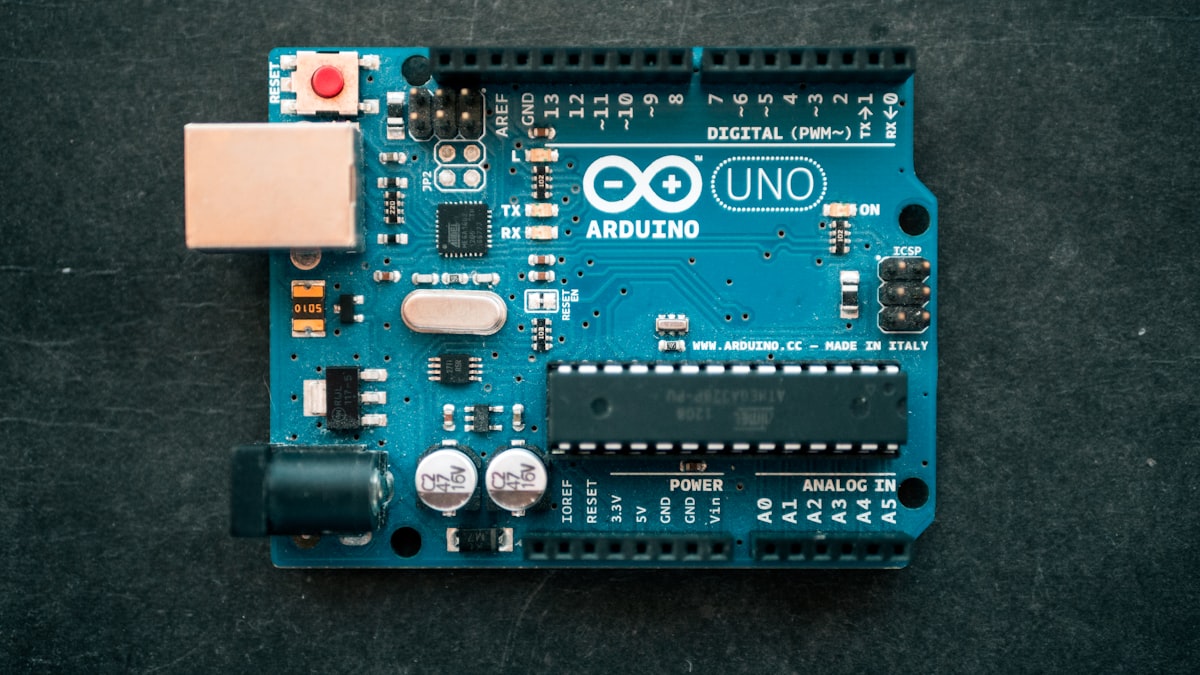
This is one of the most common questions we get from Malaysian students starting their final year project: should I use Arduino or ESP32?
The short answer is: for most FYP projects in 2026, ESP32 is the better choice. But the longer answer depends on what you're building, your budget, and what your supervisor expects. This comparison is based on what we've actually seen working across 400+ FYP projects — not just spec sheets.
What Is Arduino?
Arduino is a family of open-source microcontroller boards based around the AVR ATmega chip (in the classic Uno) or the ARM Cortex-M0 (in the Zero and Nano). The original Arduino Uno runs at 16 MHz, has 2KB of SRAM, and comes with 14 digital I/O pins. It has no wireless connectivity built in.
What Arduino does brilliantly is simplicity. The IDE is forgiving, the community is enormous, and tutorials exist for almost every sensor and actuator you'd use in a typical FYP. If you've never touched embedded hardware before, Arduino is the gentler entry point.
What Is ESP32?
ESP32 is a microcontroller made by Espressif, a Chinese semiconductor company. It runs at up to 240 MHz (dual-core), has 520KB of SRAM, and comes with WiFi and Bluetooth built in. The most common form factor you'll find in Malaysia is the ESP32 DevKit V1, which costs around RM12–RM18 on Shopee.
Crucially, ESP32 is programmed using the Arduino IDE — you write the same kind of C/C++ code. So if you know Arduino, you already know ESP32. You just get a much more capable board for roughly the same price.
Head-to-Head Comparison
| Feature | Arduino Uno | ESP32 |
|---|---|---|
| Price (RM, Shopee) | RM18–RM35 | RM12–RM18 |
| Clock speed | 16 MHz | 240 MHz (dual-core) |
| RAM | 2 KB | 520 KB |
| Flash storage | 32 KB | 4 MB |
| WiFi | ❌ No (needs shield) | ✅ Built in |
| Bluetooth | ❌ No (needs module) | ✅ Built in (BLE + Classic) |
| Programming language | C/C++ (Arduino IDE) | C/C++ (Arduino IDE) |
| Analog inputs | 6 | 18 |
| DAC outputs | 0 | 2 |
| Operating voltage | 5V | 3.3V |
| Power consumption | Higher | Lower (deep sleep mode) |
| Community size | Very large | Large and growing fast |
Where Arduino Is Still the Right Choice
Despite ESP32 being more powerful, there are situations where Arduino Uno makes more sense:
1. Your project doesn't need internet If you're building a standalone controller — say, an automated watering system that runs locally with no data logging, or a line-following robot — you don't need WiFi. An Uno keeps things simple.
2. You're completely new to electronics Arduino Uno's 5V tolerance means you're less likely to accidentally fry the board. ESP32's GPIO pins are 3.3V and not 5V tolerant — connecting a 5V sensor directly can permanently damage it. For first-timers, that's a real risk.
3. Your supervisor recommends it Some supervisors in Malaysian universities have taught Arduino for years and have existing example code and reference material. If your supervisor is one of them, don't fight it. Use Arduino and leverage the support you'll get.
4. Motor-heavy projects If your project needs a lot of 5V motor outputs, working with 5V directly from Arduino is sometimes cleaner than level-shifting from 3.3V ESP32.
Where ESP32 Wins (Most FYP Cases)
1. IoT projects This is the big one. If your FYP involves sending data to the internet, controlling devices remotely, or building a dashboard, ESP32's built-in WiFi makes this trivial. With Arduino Uno, you'd need to add a separate ESP8266 module or WiFi shield, adding cost and complexity.
2. Projects with dashboards and apps Examiners in 2026 expect to see data visualisation. An ESP32 can connect directly to Firebase, a web server, or a cloud platform like Blynk with minimal extra hardware. This turns a decent project into a great one.
3. Real-time data processing Tasks like camera image processing (with ESP32-CAM), FFT on audio signals, or handling multiple sensor streams at once are simply not feasible on a 16 MHz Uno. ESP32's dual-core 240 MHz processor handles this comfortably.
4. Battery-powered projects ESP32 has a proper deep sleep mode that draws around 10 microamps. An Arduino Uno on batteries drains them in hours. If your FYP is a portable or field-deployed device, this is critical.
5. Better value on a Malaysian student budget An ESP32 board costs less than a genuine Arduino Uno but gives you WiFi, Bluetooth, more pins, more memory, and more processing power. The value proposition is hard to argue with.
The ESP32 Gotchas (Things to Know Before You Buy)
GPIO voltage: 3.3V only ESP32 pins are not 5V tolerant. If you're using sensors that output 5V logic (like some cheap ultrasonic modules), you need a voltage divider or logic level converter. RM2 on Shopee, but you need to know it's required.
Boot issues with certain pins A handful of GPIO pins on ESP32 affect the boot process. GPIO0, GPIO2, GPIO12, and GPIO15 should be used carefully. Pulling them HIGH or LOW incorrectly during boot will prevent the board from starting. Stick to GPIO 4, 5, 13, 14, 16–33 for your sensors and avoid the boot-sensitive ones.
3.3V peripherals only on 3.3V power rail The 3.3V pin on ESP32 can only supply about 50–150mA depending on the board. Don't power multiple servos or high-current motors from it directly. Use external power for motors.
Some cheap clones have unreliable WiFi If you buy a very cheap ESP32 clone, the WiFi antenna quality can be poor. Spend a little more for a recognisable brand from a reputable Shopee seller. Failing to connect to WiFi during your viva demo is not an experience you want.
Our Recommendation for FYP 2026
For most Malaysian university students doing an engineering or IT final year project in 2026, use ESP32. Specifically:
- Hardware/IoT FYP: ESP32 DevKit V1 (for most projects) or ESP32-CAM (if you need a camera)
- Software-only FYP: neither — you don't need a microcontroller
- Robotics/motor control FYP: Arduino Mega or Arduino Uno (more robust 5V I/O for motors)
- Advanced IoT with video: Raspberry Pi 4
If you're doing any project that involves a web dashboard, mobile app, or cloud data logging — and most FYP projects do in 2026 — ESP32 is the right choice.
Common Malaysian Student Mistakes When Buying
1. Buying a genuine Arduino Uno unnecessarily Genuine Arduino Unos can cost RM60–RM100 in Malaysia. Unless your university lab specifically requires it, a compatible clone at RM18 or an ESP32 at RM15 does the job.
2. Not buying spares Buy at least two of every microcontroller you get. Boards die. Bad USB cables fry boards. This has ended FYPs. RM15 for a spare ESP32 is the best insurance policy available.
3. Buying sensors one at a time A good sensor kit from Shopee (37-in-1 or 45-in-1 sensor kits) costs RM30–RM60 and gives you most of the sensors you'll need for a typical IoT FYP. Much cheaper than buying individual sensors.
Need Help Deciding?
If you've got a project idea and you're not sure which board to use, WhatsApp us at Rectronx Circuits. We'll tell you in 2 minutes what hardware you need and whether your project is achievable before your deadline. It's free, it's quick, and it might save you from ordering the wrong thing.
Looking for more inspiration? Browse 500+ FYP project titles by category and get a free quote.